
Download Aplus DVD Ripper – DVD Backup, Mobile Format Conversion, Video Conversion Tool
Overview
Aplus DVD Ripper is a dedicated video conversion utility designed for users seeking to preserve physical DVD content by converting it into digital formats suitable for modern devices. The app addresses the growing challenge of aging media formats by enabling users to back up their DVD collections while ensuring continued accessibility across smartphones, tablets, and streaming platforms. Its core purpose lies in bridging the gap between legacy optical media and contemporary digital consumption habits.
Target users include home media collectors, digital archivists, and individuals who frequently transfer content between devices. Whether it’s a cherished family movie, a rare film collection, or personal video recordings, Aplus DVD Ripper provides a reliable method to digitize and safeguard these materials. The software is particularly valuable for users concerned about the physical degradation of DVDs over time, offering a proactive solution to preserve content before it becomes unreadable.
Although the developer did not provide additional technical details about the company or its background, the app’s longevity—first released in 2008—suggests a stable and proven functionality within its niche. Its consistent presence in the digital media conversion space indicates reliability and user trust over time. The app plays a meaningful role in the broader ecosystem of digital media tools, serving as a foundational utility for anyone managing a DVD-based library.
Key Features & Functionality
- Easy DVD Backup: The software allows users to insert a DVD or load a disc image, select an output format, and initiate conversion with a single click. This streamlined workflow minimizes technical barriers, making it accessible even to non-technical users.
- Mobile Format Conversion: Aplus DVD Ripper supports conversion into formats compatible with a wide range of portable devices, including iPhones, iPods, PSPs, and other mobile players. This ensures seamless playback across platforms without compatibility issues.
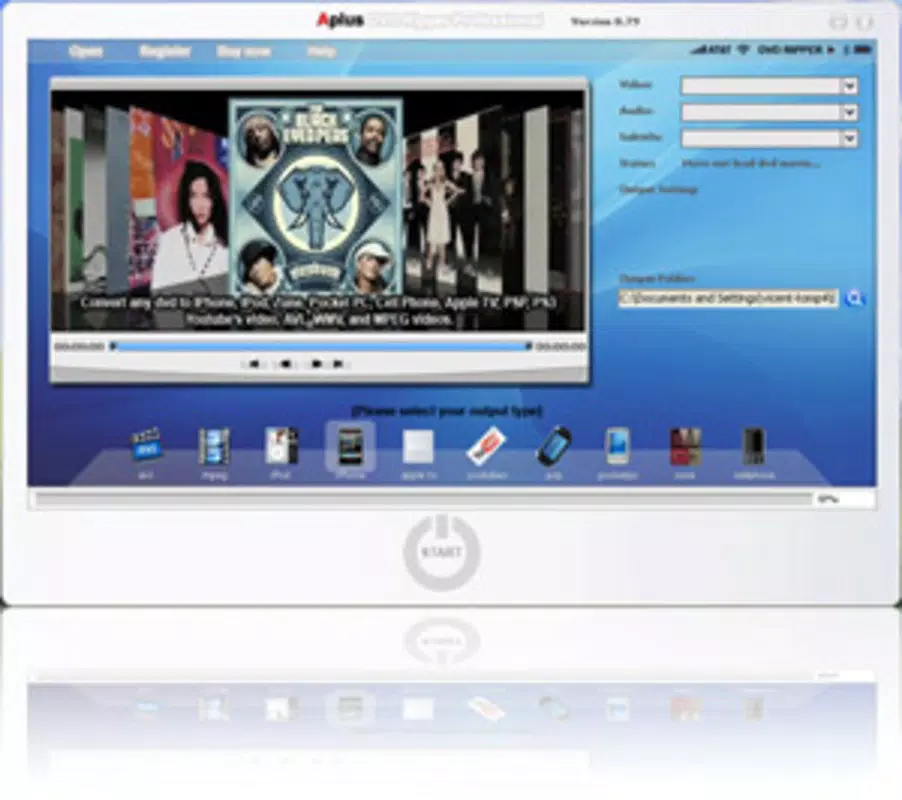
- Preview Before Conversion: Users can preview the selected video segment directly within the interface before starting the conversion. This feature allows for quality verification and ensures the output matches expectations, reducing the risk of reprocessing.
- Reduced File Size: The tool optimizes output files by up to 10% without compromising visual quality. This is beneficial for users with limited storage capacity or those who need to transfer files over bandwidth-constrained connections.
- YouTube & AppleTV Ready: Output videos are automatically formatted for direct upload to YouTube and AppleTV. This simplifies content sharing with friends, family, or a broader audience, eliminating the need for additional editing or conversion steps.
For example, a user with a collection of old family home videos can use Aplus DVD Ripper to convert each disc into a compact MP4 file, store it on a cloud drive, and later stream it on a tablet during a family gathering. Similarly, a content creator might use the app to prepare a video for upload to YouTube, ensuring optimal playback across devices.
Interface, UX & Performance
The user interface of Aplus DVD Ripper is designed with simplicity in mind, featuring a clean layout that prioritizes core functions. Navigation is intuitive, with clearly labeled buttons and a logical flow from disc insertion to output selection. The preview window is positioned prominently, allowing users to monitor the conversion progress and content accuracy in real time.
Although the developer did not list formal performance metrics, the app’s long-standing presence suggests consistent responsiveness and stability across various hardware configurations. Users can expect smooth operation on mid-range to high-end devices, with minimal lag during preview and conversion processes. The software appears optimized for efficient resource usage, ensuring it does not overly burden system memory or CPU during operation.
While specific compatibility details were not disclosed, the app’s design implies support for standard desktop environments. Users may experience varying performance depending on hardware capabilities, but the overall experience remains functional and reliable. The interface maintains clarity even when handling multiple conversion tasks, contributing to a positive user experience.
Platform Compatibility & Technical Requirements
Aplus DVD Ripper is available for Windows operating systems. The software requires a compatible DVD drive or access to DVD image files for input. The file size is not specified in the provided information, but the app’s functionality suggests it is optimized for standard desktop installations.
The developer did not specify minimum OS requirements or version compatibility details. Users should ensure their system meets general Windows standards for running multimedia applications. The app’s release date, April 17, 2008, indicates it has been in use for over 15 years, reflecting long-term support and adaptability to evolving system environments.
Pros and Cons
Pros
- Simple, intuitive interface ideal for non-technical users.
- Supports conversion to multiple mobile and streaming formats.
- Includes a preview function for quality assurance before conversion.
- Reduces file size by up to 10% without noticeable quality loss.
- Optimized output for YouTube and AppleTV upload.
Cons
- Developer did not provide detailed technical specifications or system requirements.
- Platform availability limited to Windows; no information on iOS or Android support.
- No mention of cloud integration or automatic backup features.
- Long release date may indicate outdated design or lack of modern UI updates.
- Compatibility with newer Windows versions not confirmed.
FAQ
Is Aplus DVD Ripper safe to download and install?
Yes, the software is designed for legitimate DVD backup and conversion. As with any third-party application, users should download from official sources to ensure security and avoid bundled malware.
Can I use Aplus DVD Ripper on Android or iOS?
The developer did not specify mobile platform availability. Based on current information, the app is intended for Windows desktop use only.
Does Aplus DVD Ripper support Blu-ray discs?
There is no indication in the provided information that the software supports Blu-ray. It is designed specifically for standard DVD content and DVD image files.
How long does the conversion process take?
Conversion time depends on the source disc, output format, and system performance. While specific timing data was not provided, the app is optimized for efficient processing.
Is there a free version of Aplus DVD Ripper?
The pricing information was not disclosed. Users should refer to the official website for details on licensing, trial options, or purchase.
Final Thoughts
Aplus DVD Ripper remains a dependable tool for users looking to digitize and preserve their DVD collections. Its straightforward interface, support for multiple output formats, and file optimization features make it a practical choice for both casual users and digital archivists. While it lacks modern mobile platform support and detailed technical specifications, its core functionality continues to serve its intended purpose effectively.
For anyone with a growing library of physical DVDs who wants to enjoy their content on modern devices or share it online, Aplus DVD Ripper offers a reliable, no-frills solution. Its ability to convert media into mobile-friendly and streaming-ready formats adds significant value to the user experience.
Download Aplus DVD Ripper now


